EN
EN ES
ES RU
RU DE
DE PL
PL IT
IT TR
TR FR
FR BR
BR NL
NL CZ
CZ UA
UA HU
HU SE
SE Sale
Sale Webzen - IT 解决方案和商业服务 WordPress 主题
 减价出售:
减价出售: 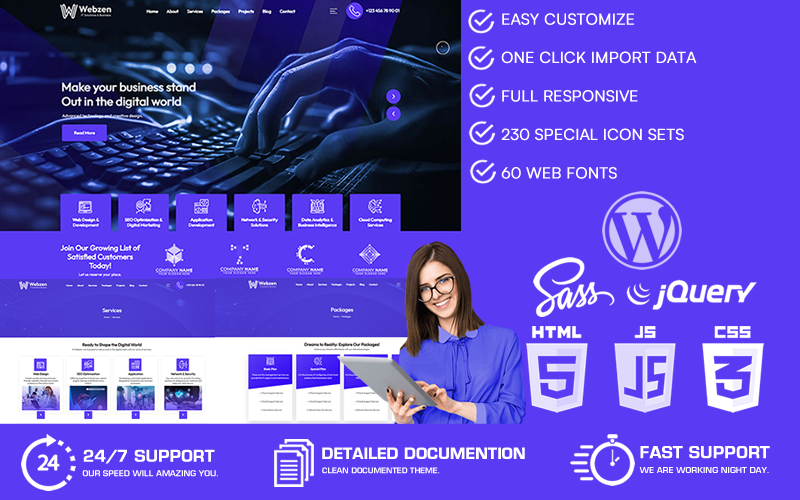
Choose a license
Popular Services from WordPress Themes Experts
 进入订阅
进入订阅
MonsterONE - 无限制下载 $14.08/月
 License permits using this item to create unlimited digital end products for sale during the active period of your subscription.
|
Support
加入后可下载此产品 免费
License permits using this item to create unlimited digital end products for sale during the active period of your subscription.
|
Support
加入后可下载此产品 免费


Webzen WordPress 主题:踏上数字之旅
准备使用 Webzen WordPress 主题踏上数字之旅。 Webzen IT Solutions 自豪地推出了这款专为网页设计、网页开发和技术公司量身定制的创意 WordPress 主题。该主题采用迷人的蓝色色调设计,只需在主题设置中单击一下即可轻松自定义所有颜色和色调。
Webzen 是一个开创性的主题,以其尖端的数字图标集而与众不同。让我们深入了解 Webzen WordPress 主题的传奇功能:
- 具有粒子效果的创意滑块:该主题拥有一个具有迷人粒子效果的创意滑块区域,为您的访问者创造引人入胜的视觉体验。
- 现代全屏缩放滑块:体验现代全屏缩放滑块,它不仅具有视觉吸引力,而且还在服务框中包含了自定义图标集。
- 用于客户徽标的滑动轮播:通过用于客户徽标的专用滑动轮播区域展示您有价值的客户和合作伙伴,从而提高您的可信度。
- 现代关于部分:主题包括带有连续移动背景形状的现代关于部分,为您的网站增添活力。
- 具有悬停效果的自定义图标框集:通过带有复杂悬停效果的自定义图标框集提升您的网络形象,使您的服务脱颖而出。
- 服务箱布局:该主题提供线条流畅的服务箱布局,以有效展示您的服务范围。
- 项目框布局:用传达专业性和风格的项目框布局展示您的作品集。
- 高级服务详细信息页面:享受带有现代侧边栏和互动元素的增强服务详细信息页面,让您的客户全面了解您的产品。
- 高级项目详细信息页面:通过高级项目详细信息页面巧妙地展示您的项目,突出您的专业知识。
- 现代形式:使用现代 3D 效果形式和迷人的弹出窗口轻松与观众互动。
- 带有自定义图标集的页脚:用带有自定义图标集和优雅线条的页脚给访问者留下深刻的印象,留下持久的印象。
- 引人注目的标题:通过不断闪烁的标题电话区域直接关注您的联系号码,引导访问者取得联系。
- 现代标题菜单:该主题具有带有微妙线条的时尚标题菜单,确保轻松导航。
- 悬停效果团队部分:通过具有迷人悬停效果的现代团队部分,以时尚的方式展示您的团队。
- 现代博客页面:让您的受众参与以具有视觉吸引力的格式提供内容的现代博客页面。
- 返回顶部按钮:通过快速“返回顶部”按钮轻松导航,增强用户体验。
- 轻松定制:通过用户友好的管理面板享受轻松定制,只需单击一下即可更改颜色、色调和徽标。
- 现代界面设计:体验与您的企业形象完美契合的现代界面设计。
Webzen 与 Elementor 等构建器不兼容,因为它在自定义 API 驱动的 ACF 框架上运行。所有页面元素都是主题的一部分,自定义就像在编辑主题页面时填写编辑器下方的选项卡一样简单。
您只需单击一下即可轻松调整主题设置中的徽标、颜色、色调、字体和大小等企业标识元素。
不要错过探索这个非凡主题并将您的数字形象提升到新水平的机会。使用 Webzen,您不仅仅是创建一个网站;您还可以创建一个网站。您正在为观众打造独特的在线体验。
更新日志
1.0.6 Critical Update – Advanced Custom Fields (ACF) has been upgraded to Secure Custom Fields (SCF) v6.8.2.
This release migrates the plugin from Advanced Custom Fields Pro to Secure Custom Fields (SCF) — a more secure and actively maintained alternative with the same feature set and full API compatibility. SCF v6.8.2 includes the latest security patches, performance improvements, and full compatibility with the latest WordPress versions. No configuration changes are required; all existing field groups and data remain fully intact.
Please ensure your server is running PHP 8.0 or higher before proceeding with the update.
If you have previously purchased the theme, please re-download it from the system and perform a manual reinstallation. After removing the old ACF plugin, a prompt will automatically appear asking you to reinstall the plugin — simply click the prompt to install and activate it. Once activated, SCF v6.8.2 will be up and running.
1.0.5 Critical Update – Advanced Custom Fields has been upgraded to v6.5.1. This release fixes potential security vulnerabilities and improves compatibility and stability with the latest WordPress versions for better performance.
1.0.4 Critical Update: Our theme has been updated to include Advanced Custom Fields (ACF) version 6.3.12. This release addresses potential security vulnerabilities to keep your site safe, and offers improved compatibility and stability with the latest WordPress versions to boost performance. We strongly recommend updating as soon as possible: simply re-download the updated theme, manually upload it via the theme upload section, then deactivate and delete your existing ACF plugin. After that, a prompt will appear under required theme plugins—install and activate the new ACF version from there, and you’ll be all set.
1.0.3
Advanced Custom Field Framework Plugin has been updated to version 6.3.6. Classic Editor, Classic Widgets, Contact Form 7, Duplicate Menu, Duplicate Page and all necessary plugins for the theme have been updated to the latest version. To avoid security problems, those who purchased the theme can download the theme again and manually install the plugins from the "inc/plugins/" area. When updating plugins, make sure your PHP versions are 8.0 and above.
1.0.2
Advanced Custom Field Framework Plugin 6.2.6.1 Upgraded, updated - Important critical update. It needs to be reinstalled. When updating plugins, make sure your PHP versions are 8.0 and above.
1.0.1
Acf Advanced Custom Field 6.2.1 plugin has been updated.
0 Reviews for this product
0 Comments for this product
Customer Support
This rating is based on feedback from customers who have received support from the author of this product.
This value represents the average response time to a client's inquiry or request.