EN
EN ES
ES RU
RU DE
DE PL
PL TR
TR FR
FR BR
BR NL
NL CN
CN CZ
CZ UA
UA HU
HU SE
SE Sale
Sale ESHOP | Modello di pannello di amministrazione e-commerce Bootstrap 5
 Con il prodotto otterrai 6 mesi di assistenza da parte dell'autore. Per ulteriori informazioni sulle caratteristiche incluse, ti preghiamo di leggere la politica sull'assistenza.
 Vendite:
Scegliere una licenza
Popular Services from Temi Admin Experts
 Abbonamento
MonsterONE - Download Illimitati per 14.08$/mese
License permits using this item to create unlimited digital end products for sale during the active period of your subscription.
|
Supporto
Abbonati per Scaricare questo Articolo Gratuitamente


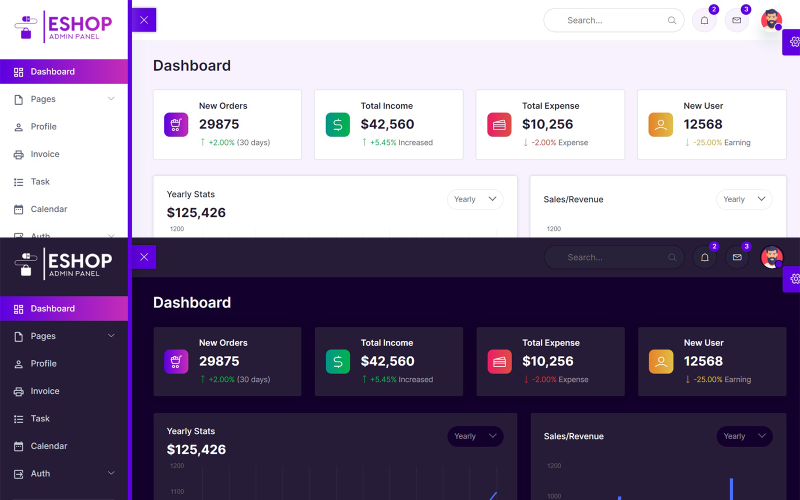
ESHOP è il template del pannello di amministrazione per l'e-commerce basato sul popolare framework Bootstrap 5.1.3. Il design di E-commerce Admin si basa sul design dell'interfaccia utente di Bootstrap e, alla fine, si presenta con un design pulito e ordinato. È basato sul popolare framework Bootstrap. Inoltre, include numerosi plugin di terze parti, widget riutilizzabili e molto altro ancora...
Caratteristica
Modello di pannello di amministrazione per l'e-commerce Bootstrap 5
Costruito con Bootstrap 5.1.3
Design super pulito
Icone di linea
Componenti dell'interfaccia utente Bootstrap 5 estesi
Icone del Material Design
Editor di moduli (Quill JS)
Oltre 30 pagine HTML
Modalità chiara e scura
Supporto HTML5 Flexbox
Pagine HTML tra cui:
Pannello di controllo
Impostazioni
Progetti
Clienti
Prezzi
Chiacchierata
Profilo
Fattura
Compito
Calendario
Registrazione
Iscrizione
Reimposta password
Avvisi
Pulsanti
Carte
Modali
Schede
Tipografia
Icone di linea
Icone del Material Design
Elementi del modulo
Layout del modulo
Tabelle
Editor di moduli (Quill JS)
Validazione del modulo
Tabella di base
Tabella reattiva
Tabella dati reattiva
Grafico JS
Grafico Apex
Notifiche
Changelog
ESHOP is the Ecommerce admin panel template which built on top of the popular framework Bootstrap 5.1.3. Concept of design for Ecommerce Admin is based on the Bootstrap UI design and finally it comes out with a clean and neat design. It is built on top of the popular Bootstrap Framework. Besides that, it is bundled with a lot of third party plugins, reusable widget and much more
- On dashboard page we showing the New Orders, Total Income, Total Expenses, New Users.
If you want to change the above things open index.html then edit the file.
- Next we showing Yearly Stats, Sales/Revenue, Sales by State, Sales Forecast, Traffic chart with the help of a Chart JS on dashboard.
If you want to change the above things open index.html then edit the file.
- Next we showing Top Selling Products with the help of table on dashboard.
If you want to change the above things open index.html then edit the file.
- Next we showing Monthly Calendar with the help of a Full Calendar JS on dashboard.
If you want to change the above things open index.html then edit the file.
- Next we showing Top Search, Notifications, Messages, and Profile Menu on all pages.
If you want to change the above things open all .html files then edit the files.
- Next we showing Sidebar for Menu on all pages.
If you want to change the sidebar menu open all .html files then edit the files.
- Next we showing Settings Icon on right side in fixed position for theme change on all pages.
If you want to change the Settings icon open all .html files then edit the files.
- Next we showing Footer on bottom of the page on all pages.
If you want to change the Footer open all .html files then edit the files.
- Next we use a Bootstrap 5 on all pages for columns, rows, containers.
If you want to change the Bootstrap open all .html files then edit the files.
- Next we use a Line Icons on all pages.
If you want to change the Line Icons open all .html files then edit the files.
- Next we use a Quill Editor v1.3.6
If you want to change the Line Icons open all .html files then edit the files.
- Next we use a Vanilla Data Tables
If you want to change the Data Tables open all .html files then edit the files.
- Next we use Main.css for custom css changes on all pages
If you want to change the Main.css open css folder then main.css file then edit the file.
- Next we use Main.js for custom js changes on all pages
If you want to change the Main.js open js folder then main.js file then edit the file.
January 5, 2024: I have added discount on product.
0 Recensioni per questo prodotto
0 Commenti per questo prodotto