EN
EN ES
ES RU
RU DE
DE PL
PL IT
IT TR
TR FR
FR BR
BR NL
NL CN
CN CZ
CZ HU
HU SE
SE Sale
Sale ІНТЕРНЕТ-МАГАЗИН | Шаблон панелі адміністратора електронної комерції Bootstrap 5
 З продуктом ви отримаєте підтримку автора на 6 місяців. Щоб дізнатись більше про те, що включено, ознайомтеся з політикою підтримки.
 Продажі:
Виберіть ліцензію
Popular Services from Шаблони для адмінок Experts
 Підписка
MonsterONE - Необмежені завантаження за $10.75/міс.
License permits using this item to create unlimited digital end products for sale during the active period of your subscription.
|
Підтримка
Приєднуйтесь та завантажте цей продукт


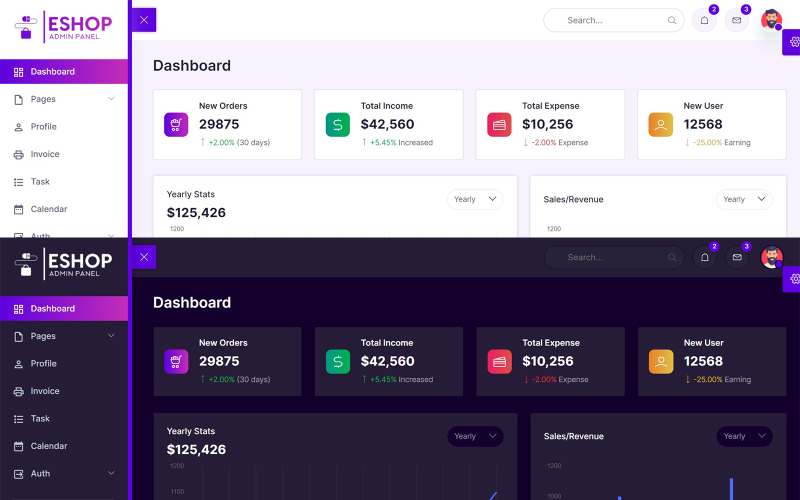
ESHOP – це шаблон адміністративної панелі електронної комерції, побудований на популярному фреймворку Bootstrap 5.1.3. Концепція дизайну для адміністратора електронної комерції базується на дизайні інтерфейсу Bootstrap, і в результаті виходить чистий та акуратний дизайн. Він побудований на популярному фреймворку Bootstrap. Крім того, він постачається з безліччю сторонніх плагінів, віджетами багаторазового використання та багатьма іншими...
Функція
Шаблон адміністративної панелі електронної комерції Bootstrap 5
Зроблено за допомогою Bootstrap 5.1.3
Супер чистий дизайн
Лінійні іконки
Розширені компоненти інтерфейсу Bootstrap 5
Іконки матеріального дизайну
Редактор форм (Quill JS)
30+ HTML-сторінок
Світлий і темний режим
Підтримка HTML5 Flexbox
HTML-сторінки, включаючи:
Інформаційна панель
Налаштування
Проєкти
Клієнти
Ціноутворення
Чат
Профіль
Рахунок-фактура
Завдання
Календар
Увійти
Зареєструватися
Скинути пароль
Сповіщення
Ґудзики
Картки
Модальні вікна
Вкладки
Типографіка
Лінійні іконки
Іконки матеріального дизайну
Елементи форми
Макет форми
Столи
Редактор форм (Quill JS)
Перевірка форми
Базова таблиця
Адаптивна таблиця
Адаптивна таблиця даних
Діаграма JS
Діаграма Apex
Сповіщення
Журнал змін
ESHOP is the Ecommerce admin panel template which built on top of the popular framework Bootstrap 5.1.3. Concept of design for Ecommerce Admin is based on the Bootstrap UI design and finally it comes out with a clean and neat design. It is built on top of the popular Bootstrap Framework. Besides that, it is bundled with a lot of third party plugins, reusable widget and much more
- On dashboard page we showing the New Orders, Total Income, Total Expenses, New Users.
If you want to change the above things open index.html then edit the file.
- Next we showing Yearly Stats, Sales/Revenue, Sales by State, Sales Forecast, Traffic chart with the help of a Chart JS on dashboard.
If you want to change the above things open index.html then edit the file.
- Next we showing Top Selling Products with the help of table on dashboard.
If you want to change the above things open index.html then edit the file.
- Next we showing Monthly Calendar with the help of a Full Calendar JS on dashboard.
If you want to change the above things open index.html then edit the file.
- Next we showing Top Search, Notifications, Messages, and Profile Menu on all pages.
If you want to change the above things open all .html files then edit the files.
- Next we showing Sidebar for Menu on all pages.
If you want to change the sidebar menu open all .html files then edit the files.
- Next we showing Settings Icon on right side in fixed position for theme change on all pages.
If you want to change the Settings icon open all .html files then edit the files.
- Next we showing Footer on bottom of the page on all pages.
If you want to change the Footer open all .html files then edit the files.
- Next we use a Bootstrap 5 on all pages for columns, rows, containers.
If you want to change the Bootstrap open all .html files then edit the files.
- Next we use a Line Icons on all pages.
If you want to change the Line Icons open all .html files then edit the files.
- Next we use a Quill Editor v1.3.6
If you want to change the Line Icons open all .html files then edit the files.
- Next we use a Vanilla Data Tables
If you want to change the Data Tables open all .html files then edit the files.
- Next we use Main.css for custom css changes on all pages
If you want to change the Main.css open css folder then main.css file then edit the file.
- Next we use Main.js for custom js changes on all pages
If you want to change the Main.js open js folder then main.js file then edit the file.
January 5, 2024: I have added discount on product.
0 Відгуків про цей товар
0 Коментарі до цього продукту