EN
EN ES
ES RU
RU DE
DE PL
PL IT
IT TR
TR FR
FR NL
NL CN
CN CZ
CZ UA
UA HU
HU SE
SE Sale
Sale ESHOP | Modelo de painel de administração de comércio eletrônico Bootstrap 5
 Você obterá 6 meses de suporte do autor com o produto. Para saber mais sobre o que está incluído, por favor, leia a politica de suporte.
 Vendas:
Criado: 3 de mar. de 2022
Atualizado : 18 de jan. de 2024
Identificação: 232474
Escolher uma licença
Popular Services from Templates Para Painel de Controle Experts
 Assine
MonsterONE - Downloads Ilimitados por $14.08/mês
License permits using this item to create unlimited digital end products for sale during the active period of your subscription.
|
Suporte
Se Adira para Baixar Este Item


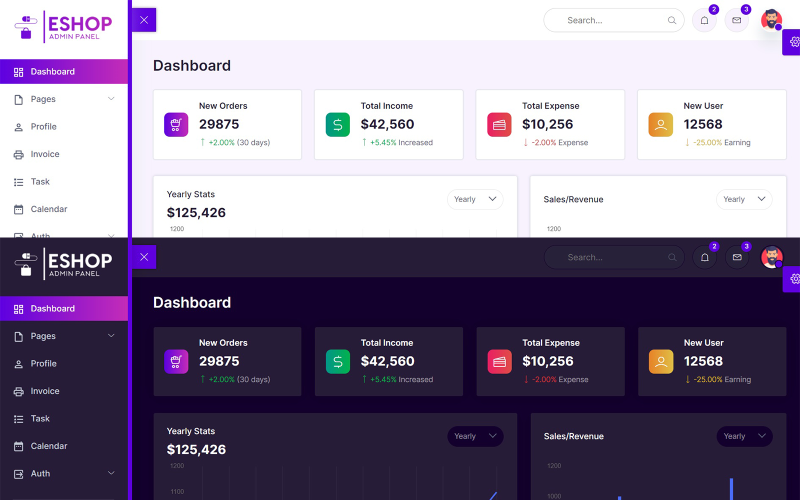
ESHOP é um modelo de painel administrativo para e-commerce construído sobre o popular framework Bootstrap 5.1.3. O conceito de design para o painel administrativo de e-commerce é baseado no design de interface do Bootstrap, resultando em um design limpo e organizado. Além disso, ele inclui diversos plugins de terceiros, widgets reutilizáveis e muito mais…
Recurso
Modelo de painel administrativo de comércio eletrônico Bootstrap 5
Construído com Bootstrap 5.1.3
Design super limpo
Ícones de linha
Componentes de interface do usuário do Bootstrap 5 estendidos
Ícones do Material Design
Editor de formulários (Quill JS)
Mais de 30 páginas HTML
Modo claro e modo escuro
Suporte a HTML5 Flexbox
Páginas HTML incluindo:
Painel
Configurações
Projetos
Clientes
Preços
Bater papo
Perfil
Fatura
Tarefa
Calendário
Entrar
Inscrever-se
Redefinir senha
Alertas
Botões
Cartas
Modais
Abas
Tipografia
Ícones de linha
Ícones do Material Design
Elementos de formulário
Layout do formulário
Tabelas
Editor de formulários (Quill JS)
Validação de formulários
Tabela básica
Tabela Responsiva
Tabela de dados responsiva
Gráfico JS
Gráfico de Ápice
Notificações
Registro de alterações
ESHOP is the Ecommerce admin panel template which built on top of the popular framework Bootstrap 5.1.3. Concept of design for Ecommerce Admin is based on the Bootstrap UI design and finally it comes out with a clean and neat design. It is built on top of the popular Bootstrap Framework. Besides that, it is bundled with a lot of third party plugins, reusable widget and much more
- On dashboard page we showing the New Orders, Total Income, Total Expenses, New Users.
If you want to change the above things open index.html then edit the file.
- Next we showing Yearly Stats, Sales/Revenue, Sales by State, Sales Forecast, Traffic chart with the help of a Chart JS on dashboard.
If you want to change the above things open index.html then edit the file.
- Next we showing Top Selling Products with the help of table on dashboard.
If you want to change the above things open index.html then edit the file.
- Next we showing Monthly Calendar with the help of a Full Calendar JS on dashboard.
If you want to change the above things open index.html then edit the file.
- Next we showing Top Search, Notifications, Messages, and Profile Menu on all pages.
If you want to change the above things open all .html files then edit the files.
- Next we showing Sidebar for Menu on all pages.
If you want to change the sidebar menu open all .html files then edit the files.
- Next we showing Settings Icon on right side in fixed position for theme change on all pages.
If you want to change the Settings icon open all .html files then edit the files.
- Next we showing Footer on bottom of the page on all pages.
If you want to change the Footer open all .html files then edit the files.
- Next we use a Bootstrap 5 on all pages for columns, rows, containers.
If you want to change the Bootstrap open all .html files then edit the files.
- Next we use a Line Icons on all pages.
If you want to change the Line Icons open all .html files then edit the files.
- Next we use a Quill Editor v1.3.6
If you want to change the Line Icons open all .html files then edit the files.
- Next we use a Vanilla Data Tables
If you want to change the Data Tables open all .html files then edit the files.
- Next we use Main.css for custom css changes on all pages
If you want to change the Main.css open css folder then main.css file then edit the file.
- Next we use Main.js for custom js changes on all pages
If you want to change the Main.js open js folder then main.js file then edit the file.
January 5, 2024: I have added discount on product.
0 Avaliações deste produto
0 Comentários para este produto