EN
EN ES
ES RU
RU DE
DE PL
PL IT
IT TR
TR FR
FR BR
BR NL
NL CZ
CZ UA
UA HU
HU SE
SE Sale
Sale 网店 | Bootstrap 5 电子商务管理面板模板
 对于一个产品,您将从作者获得6个月的支持。要了解更多相关内容,请阅读支持政策。
 减价出售:
减价出售:
Choose a license
Popular Services from 管理模板 Experts
 进入订阅
进入订阅
MonsterONE - 无限制下载 $10.75/月
License permits using this item to create unlimited digital end products for sale during the active period of your subscription.
|
Support
加入后可下载此产品


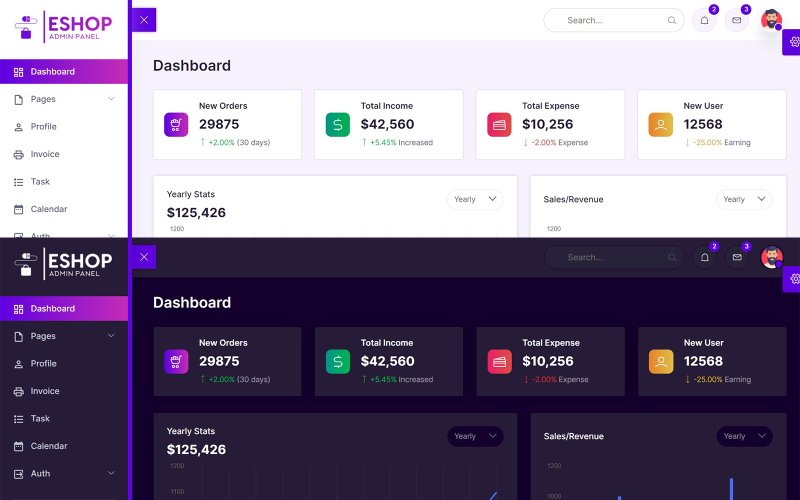
ESHOP 是一款基于流行的 Bootstrap 5.1.3 框架构建的电商后台管理面板模板。其设计理念源于 Bootstrap UI 设计,最终呈现出简洁明了的界面。除了 Bootstrap 框架之外,它还捆绑了大量第三方插件、可复用组件以及更多功能。
特征
Bootstrap 5 电子商务管理面板模板
基于 Bootstrap 5.1.3 构建
超简洁设计
线条图标
扩展的 Bootstrap 5 UI 组件
Material Design 图标
表单编辑器(Quill JS)
30多个HTML页面
浅色和深色模式
HTML5 Flexbox 支持
HTML页面包括:
仪表板
设置
项目
客户
定价
聊天
轮廓
发票
任务
日历
登入
报名
重置密码
警报
按钮
牌
情态动词
标签页
排版
线条图标
Material Design 图标
表单元素
表单布局
表格
表单编辑器(Quill JS)
表单验证
基本表
响应式表格
响应式数据表
Chart JS
顶点图表
通知
更新日志
ESHOP is the Ecommerce admin panel template which built on top of the popular framework Bootstrap 5.1.3. Concept of design for Ecommerce Admin is based on the Bootstrap UI design and finally it comes out with a clean and neat design. It is built on top of the popular Bootstrap Framework. Besides that, it is bundled with a lot of third party plugins, reusable widget and much more
- On dashboard page we showing the New Orders, Total Income, Total Expenses, New Users.
If you want to change the above things open index.html then edit the file.
- Next we showing Yearly Stats, Sales/Revenue, Sales by State, Sales Forecast, Traffic chart with the help of a Chart JS on dashboard.
If you want to change the above things open index.html then edit the file.
- Next we showing Top Selling Products with the help of table on dashboard.
If you want to change the above things open index.html then edit the file.
- Next we showing Monthly Calendar with the help of a Full Calendar JS on dashboard.
If you want to change the above things open index.html then edit the file.
- Next we showing Top Search, Notifications, Messages, and Profile Menu on all pages.
If you want to change the above things open all .html files then edit the files.
- Next we showing Sidebar for Menu on all pages.
If you want to change the sidebar menu open all .html files then edit the files.
- Next we showing Settings Icon on right side in fixed position for theme change on all pages.
If you want to change the Settings icon open all .html files then edit the files.
- Next we showing Footer on bottom of the page on all pages.
If you want to change the Footer open all .html files then edit the files.
- Next we use a Bootstrap 5 on all pages for columns, rows, containers.
If you want to change the Bootstrap open all .html files then edit the files.
- Next we use a Line Icons on all pages.
If you want to change the Line Icons open all .html files then edit the files.
- Next we use a Quill Editor v1.3.6
If you want to change the Line Icons open all .html files then edit the files.
- Next we use a Vanilla Data Tables
If you want to change the Data Tables open all .html files then edit the files.
- Next we use Main.css for custom css changes on all pages
If you want to change the Main.css open css folder then main.css file then edit the file.
- Next we use Main.js for custom js changes on all pages
If you want to change the Main.js open js folder then main.js file then edit the file.
January 5, 2024: I have added discount on product.
0 Reviews for this product
0 Comments for this product