Categories

Featured templates

Featured templates

Featured templates

Featured templates

Featured templates

Featured templates

Featured templates

Featured templates

Featured templates

Featured templates

Featured templates

Featured templates

Featured templates

Featured templates

How to drop a database

Sarah Vaynbaum March 13, 2015
Rating: 4.7/5. From 7 votes.
Please wait...

Hello, today you will learn how to drop database via PhpMyAdmin panel.

How to drop a database

In order to perform this, you need to do the steps indicated below:

  1. Enter the cpanel/phpmyadmin:

    How to drop a database1
  2. There you will see the list of databases, where you need to find the required one.

  3. Select(clik) the database, then click on the SQL tab:
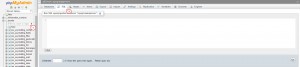
    How_to_drop_a_database2
  4. There you need to add the following SQL query and run it:

    DROP DATABASE yourdatabasename;

Those are the steps which should be performed. In case you have any further questions, feel free to check the video tutorial below.

How to drop a database

This entry was posted in Hosting FAQ and tagged database, drop, phpMyAdmin. Bookmark the permalink.

Submit a ticket

If you are still unable to find a sufficient tutorial regarding your issue please use the following link to submit a request to our technical support team. We'll provide you with our help and assistance within next 24 hours: Submit a ticket