Categories

Featured templates

Featured templates

Featured templates

Featured templates

Featured templates

Featured templates

Featured templates

Featured templates

Featured templates

Featured templates

Featured templates

Featured templates

Featured templates

Featured templates

WordPress. How to change default/landing page

Daniel Morales November 19, 2012
Rating: 4.0/5. From 2 votes.
Please wait...

This tutorial will show you how to change splash page in WordPress template.

A splash page, also known as a static page, is the first page you see when visiting a website.

Let us see how to change it.

1. Access your server and reach the following folder:

wp-content/themes/themexxxx/js

2. Open ‘main.js’ file in any php/text editor.

3. Locate the ‘startPage’ variable, it should look like this (the splash page slug may differ depending on template):
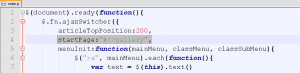
startPage:"#!/parties",

4. Put your own page slug instead of ‘parties’, f.e:

startPage:"#!/gallery",

5. Save the changes.

Splash page was successfully changed. Let us know if you have any questions.

Feel free to check the detailed video tutorial below:

WordPress. How to change default splash page

Best Themes for Wordpress
This entry was posted in WordPress Tutorials and tagged change, landing, page, splash, WordPress. Bookmark the permalink.

Submit a ticket

If you are still unable to find a sufficient tutorial regarding your issue please use the following link to submit a request to our technical support team. We'll provide you with our help and assistance within next 24 hours: Submit a ticket


