Categories

Featured templates

Featured templates

Featured templates

Featured templates

Featured templates

Featured templates

Featured templates

Featured templates

Featured templates

Featured templates

Featured templates

Featured templates

Featured templates

Featured templates

PrestaShop 1.7.x. How to create a simple product

Daisy Cooper February 1, 2017
Rating: 5.0/5. From 7 votes.
Please wait...

Hello, this tutorial will show you how to create a simple product in PrestaShop 1.7.x.

Please, navigate to Catalog -> Products -> New Product section in your site admin panel.

PrestaShop 1.7.x. How to create a simple product
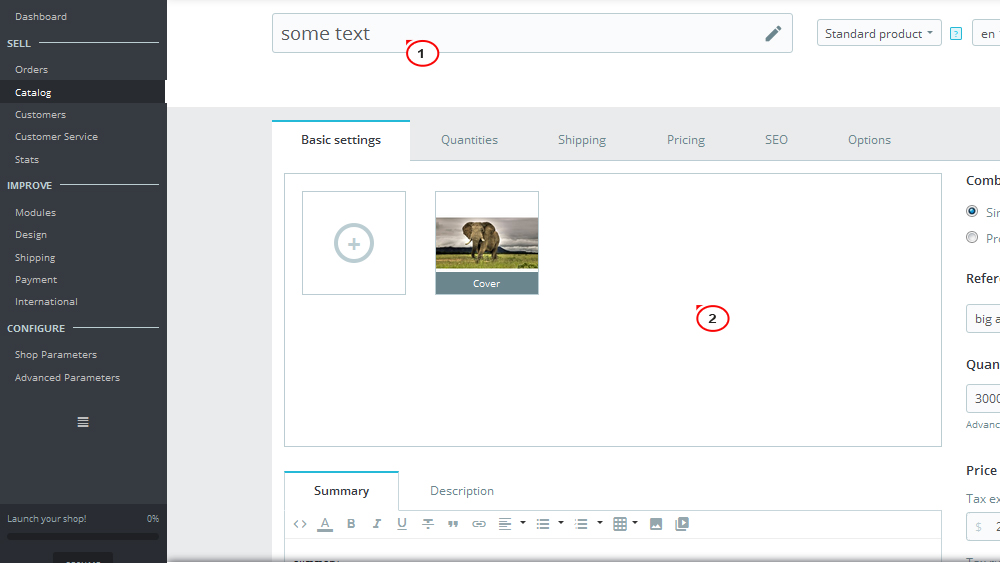
  1. In the Basic settings tab you can add the following:

    • Product name

    • Product’s image

      PrestaShop 1.7.x. How to create a simple product1
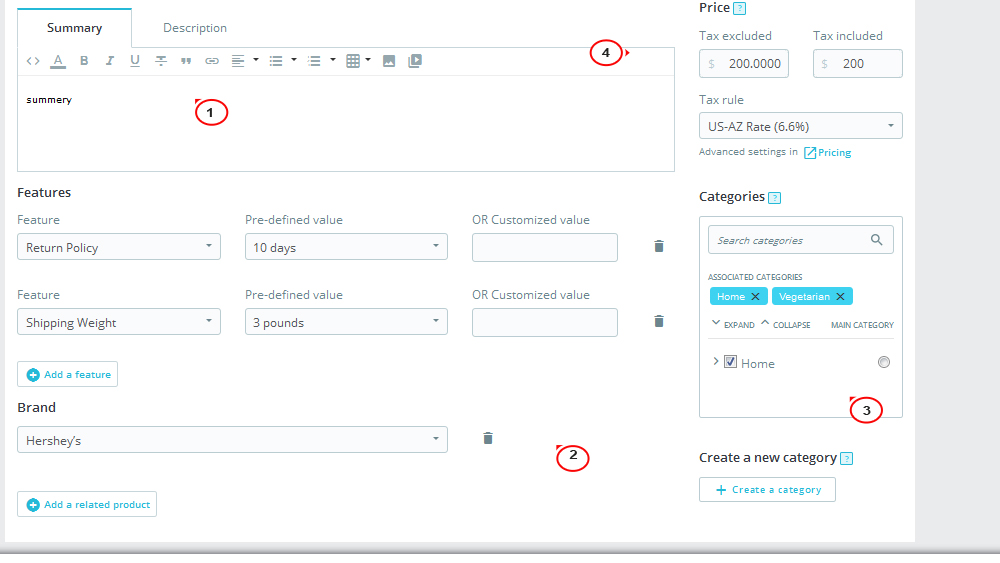
    • Summary

    • Description

    • Feature

    • Brand

    • Related products

    • Categories

    • Price

    • Quantity

    • Reference

    • Combinations

      PrestaShop 1.7.x. How to create a simple product2
  2. In the Quantities tab you can add the following:

    PrestaShop 1.7.x. How to create a simple product3
    • Combinations

    • Minimum quantity for sale

    • Availability preferences

    • Label when in stock

    • Label when out of stock (and back order allowed)

    • Availability date

  3. In the Shipping tab you can add the following:

    • Package dimension

    • Shipping fees

    • Available carriers

    PrestaShop 1.7.x. How to create a simple product4
  4. In the Pricing tab you can add the following:

    • Retail price

    • Cost price

    • Specific prices

    • Priority management

    PrestaShop 1.7.x. How to create a simple product5
  5. In the SEO tab you can add:

    • Meta title

    • Meta description

    • Friendly URL

    • Redirection page

    PrestaShop 1.7.x. How to create a simple product6
  6. In the Options tab you can add:

    • Visibility

    • Condition and References

    • Customization

    • Attached files

    • Suppliers

      PrestaShop 1.7.x. How to create a simple product8
    PrestaShop 1.7.x. How to create a simple product7

In the end, please, click on save and check the product.

Now you know how to create a simple product in PrestaShop 1.7.x. Thank you for attention!

Feel free to check the detailed video tutorial below:

PrestaShop 1.7.x. How to create a simple product
Prestashop Themes Download
This entry was posted in PrestaShop Tutorials and tagged Prestashop 1.7, simple product. Bookmark the permalink.

Submit a ticket

If you are still unable to find a sufficient tutorial regarding your issue please use the following link to submit a request to our technical support team. We'll provide you with our help and assistance within next 24 hours: Submit a ticket