Categories

Featured templates

Featured templates

Featured templates

Featured templates

Featured templates

Featured templates

Featured templates

Featured templates

Featured templates

Featured templates

Featured templates

Featured templates

Featured templates

Featured templates

How to check whether mod_rewrite is enabled on server?

Carey Burns July 8, 2015
Rating: 5.0/5. From 7 votes.
Please wait...

Our Support team is ready to present a new tutorial that shows how to check if mod_rewrite is enabled on your server.

How to check whether mod_rewrite is enabled on server?
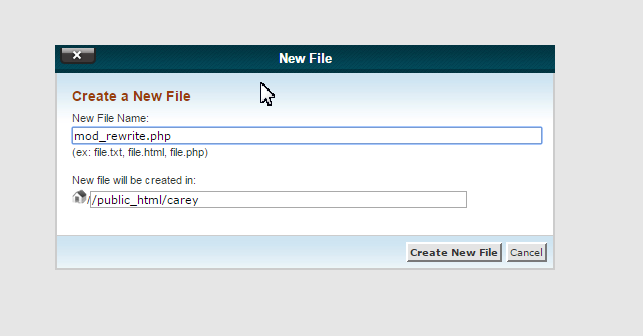
  1. Open your website root directory, create a php file mod_rewrite.php:

    how_to_check__mod_rewrite_enabled_1
  2. Add the following line of code to it:

    		 <?php echo "Mod_rewrite is activated!"; ?>
    		 
    how_to_check__mod_rewrite_enabled_2
  3. Create .htaccess file (rename the original file to .htacess_original if you have it):

    how_to_check__mod_rewrite_enabled_3
  4. Add the following content to the file:

    		 RewriteEngine On
             RewriteRule ^.*$ mod_rewrite.php
    		 
    how_to_check__mod_rewrite_enabled_4
  5. Open your site. If you see a message “Mod_rewrite is activated!”, it is enabled on your server. If you see anything else – mod_rewrite is disabled.

  6. Make sure to delete the .htaccess file you created and rename the original file back:

    how_to_check__mod_rewrite_enabled_5

Feel free to check the detailed video tutorial below:

How to check whether mod_rewrite is enabled on server?
This entry was posted in Hosting FAQ and tagged enable, hosting, mod_rewrite, server. Bookmark the permalink.

Submit a ticket

If you are still unable to find a sufficient tutorial regarding your issue please use the following link to submit a request to our technical support team. We'll provide you with our help and assistance within next 24 hours: Submit a ticket