This tutorial provides an explanation of how to enable/disable and manage breadcrumbs in CherryFramework 4 template.
CherryFramework 4. How to enable/disable and manage breadcrumbs
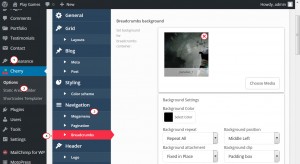
In order to manage breadcrumbs, you need to navigate to Cherry -> Options -> Navigation -> Breadcrumbs section in your WordPress admin panel. Let’s overview the options available:
-
“Breadcrumbs background” sets a background for breadcrumbs section on the website. You have the options to upload a background image and/or set a background color as well as choose the appropriate CSS options such as Background repeat, Background attachment, Background size, Background position, Background clip and Background origin:
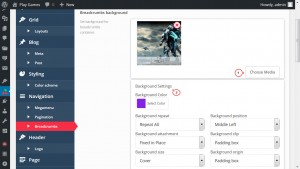
Please read the CSS documentation here to know more about CSS background properties.
-
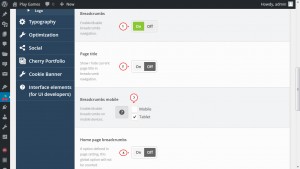
“Breadcrumbs” option allows you to enable or disable breadcrumbs navigation on the frontend.
-
“Page title” defines either to show or hide page title in breadcrumbs navigation.
-
“Breadcrumbs mobile” option enables or disables breadcrumbs on mobile/tablet devices.
-
“Home page breadcrumbs” option shows or hides breadcrumbs navigation on the home page:
-
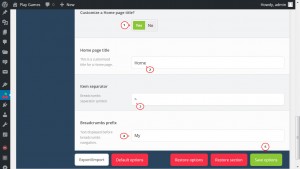
“Customize a Home page title?” option allows you to define a Home page title if it is set to “Yes”.
-
“Item separator” allows you to set the breadcrumbs separator symbol such as “/”, “>”, “|”, etc.
-
“Breadcrumbs prefix” option allows you to set the text displayed before breadcrumbs navigation:
Now you know how to enable/disable and manage breadcrumbs in CherryFramework 4 template.
Feel free to check the detailed video tutorial below:
CherryFramework 4. How to enable/disable and manage breadcrumbs









