Categories

Featured templates

Featured templates

Featured templates

Featured templates

Featured templates

Featured templates

Featured templates

Featured templates

Featured templates

Featured templates

Featured templates

Featured templates

Featured templates

Featured templates

WordPress. How to remove Google Map

Alex Ross June 29, 2012
Rating: 4.5/5. From 2 votes.
Please wait...

1) First, please go to your admin panel: Pages->Contact us page.

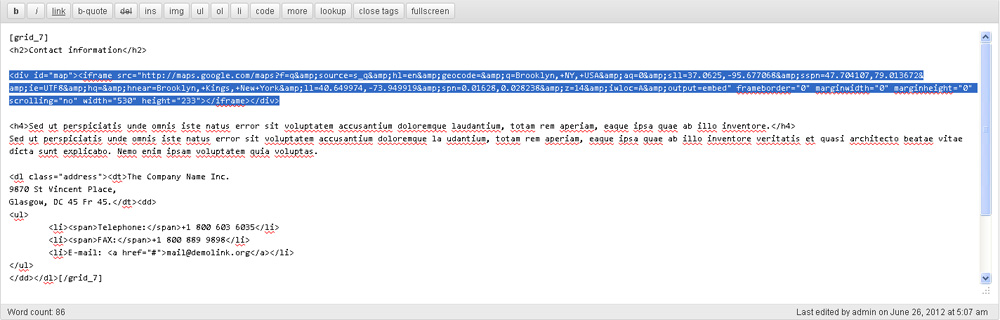
2) When you reach it, on the HTML editor you will see the code like this:


<div id="map"><iframe src="http://maps.google.com/maps?f=q&source=s_q&hl=en&geocode=&q=Brooklyn,+NY,+USA&aq=0&sll=37.0625,-95.677068&sspn=47.704107,79.013672&ie=UTF8&hq=&hnear=Brooklyn,+Kings,+New+York&ll=40.649974,-73.949919&spn=0.01628,0.028238&z=14&iwloc=A&output=embed" frameborder="0" marginwidth="0" marginheight="0" scrolling="no" width="530" height="233"></iframe></div>

3) The last step will be removing this code and saving changes.

Feel free to check the detailed video tutorial below:

how to change Google Map location in WordPress

Best Professional Wordpress Themes
This entry was posted in WordPress Tutorials and tagged map, remove, WordPress. Bookmark the permalink.

Submit a ticket

If you are still unable to find a sufficient tutorial regarding your issue please use the following link to submit a request to our technical support team. We'll provide you with our help and assistance within next 24 hours: Submit a ticket