Categories

Featured templates

Featured templates

Featured templates

Featured templates

Featured templates

Featured templates

Featured templates

Featured templates

Featured templates

Featured templates

Featured templates

Featured templates

Featured templates

Featured templates

WordPress Cherry 3.x. How to generate a sitemap (sitemap.xml)

Jeff Bell June 5, 2015
Rating: 5.0/5. From 1 vote.
Please wait...

This tutorial shows how to create a sitemap for your WordPress site.

WordPress. How to generate a sitemap (sitemap.xml)

  1. In order to create a sitemap for your WordPress site, please open your Dashboard:
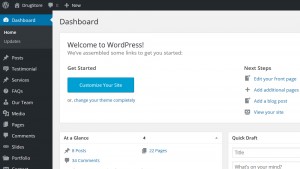
    sitemap1

  2. Navigate to Chrery options -> SEO -> Sitemap XML tab:
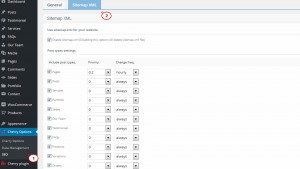
    sitemap2

  3. In Sitemap XML tab make sure that “Enable sitemap.xml” option is ticked:
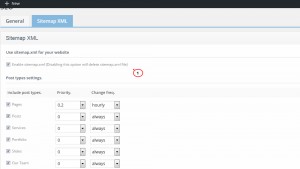
    sitemap3

  4. Tick the posts and pages types you wish to add to your sitemap.xml file, their priority and frequency:
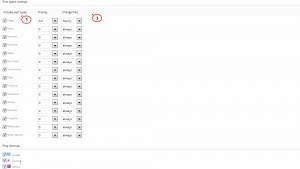
    sitemap4

  5. You can check what those metrics influence in details on the right of this page:

    sitemap5

Feel free to check the detailed video tutorial below:

WordPress. How to generate a sitemap (sitemap.xml)

Wordpress Commercial Themes
This entry was posted in WordPress Tutorials and tagged sitemap, WordPress, XML. Bookmark the permalink.

Submit a ticket

If you are still unable to find a sufficient tutorial regarding your issue please use the following link to submit a request to our technical support team. We'll provide you with our help and assistance within next 24 hours: Submit a ticket



