Categories

Featured templates

Featured templates

Featured templates

Featured templates

Featured templates

Featured templates

Featured templates

Featured templates

Featured templates

Featured templates

Featured templates

Featured templates

Featured templates

Featured templates

Magento. How to add a custom CSS file

Jack Martins January 11, 2016
Rating: 5.0/5. From 5 votes.
Please wait...

This tutorial describes how to add a custom CSS file in Magento.

Magento. How to add a custom CSS file

In order to add a custom CSS file, you should perform the following changes:

  1. Upload your custom CSS file to the server. The directory is as follows: skin/frontend/tm_themes/themeXXX/css:
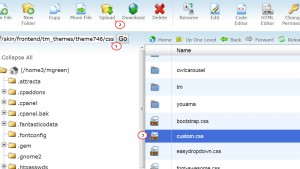
    Magento._How_to_add_a_custom_CSS_file

  2. In order to make the CSS rules work, one should link the file to the template. Please navigate to app/design/frontend/tm_themes/themeXXX/layout and edit local.xml file:
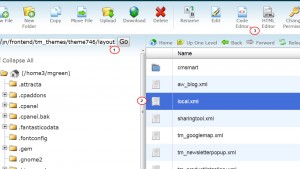
    Magento._How_to_add_a_custom_CSS_file2

  3. Insert the following piece of code somewhere among the similar ones (it basically contains the relative path to your file):

    		<action method="addCss"><stylesheet>css/custom.css</stylesheet></action>
    		

    Magento._How_to_add_a_custom_CSS_file3

  4. Save the changes.

Feel free to check the detailed video tutorial below:

Magento. How to add a custom CSS file

Best Premium Magento Themes
This entry was posted in Magento Tutorials and tagged css, custom, file, Magento. Bookmark the permalink.

Submit a ticket

If you are still unable to find a sufficient tutorial regarding your issue please use the following link to submit a request to our technical support team. We'll provide you with our help and assistance within next 24 hours: Submit a ticket


