ES
ES RU
RU DE
DE PL
PL IT
IT TR
TR FR
FR BR
BR NL
NL CN
CN CZ
CZ UA
UA HU
HU SE
SE Sale
Sale Kaddora MailFlow SMTP Plugin
 With a product you will get 6 months of support from the author. To know more about what is included, please read the support policy.
 Sales:
Choose a license
Popular Services from WordPress Plugins Experts
 Get in Subscription
MonsterONE - Unlimited Downloads for $14.08/mo
License permits using this item to create unlimited digital end products for sale during the active period of your subscription.
|
Support
Join to Download this Item


Kaddora MailFlow SMTP
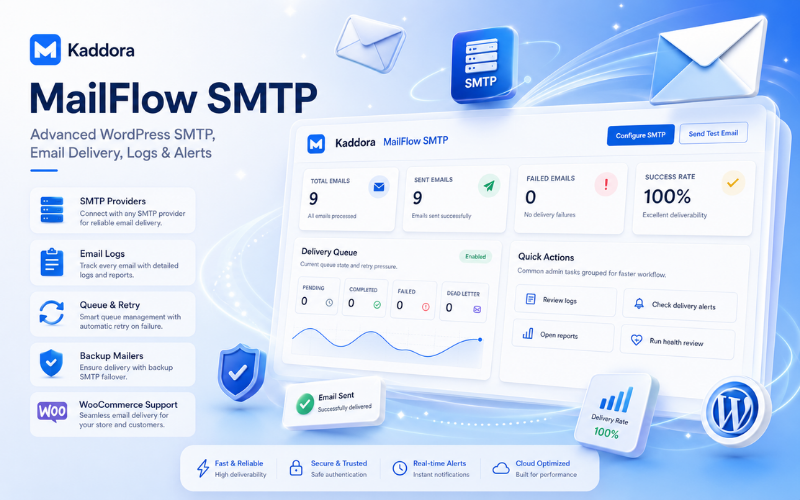
Kaddora MailFlow SMTP is a professional WordPress SMTP, email delivery, email logging, monitoring, alert, queue, reporting, and diagnostics plugin designed to improve email reliability and deliverability across WordPress websites.
The plugin replaces the default WordPress mail system with secure SMTP-based delivery and supports multiple email providers including Gmail, Outlook, SendGrid, Mailgun, Brevo, Postmark, and Custom SMTP servers.
Kaddora MailFlow SMTP is built for website owners, WooCommerce stores, agencies, developers, administrators, support teams, and enterprise WordPress environments that require reliable email delivery, detailed email logs, delivery monitoring, backup mailers, queue processing, retry handling, failure alerts, and advanced troubleshooting tools.
Plugin Overview
Kaddora MailFlow SMTP provides a complete email infrastructure for WordPress. It helps administrators configure SMTP providers, monitor outgoing emails, track successful and failed deliveries, resend messages, export logs, test SMTP connections, receive alerts, analyze provider performance, and improve overall email delivery reliability.
The plugin includes enterprise-level delivery features such as Smart Email Routing, Backup Mailers, Rate Limiting, Email Queue Processing, Retry Engine, and Dead Letter Queue management. These features help improve email delivery success and reduce the risk of missed transactional emails.
With support for WooCommerce, Contact Form 7, WPForms, and WordPress Multisite, Kaddora MailFlow SMTP is suitable for small business websites, online stores, agencies, membership websites, enterprise systems, and network-based WordPress installations.
Main Features
- Professional WordPress SMTP email delivery plugin
- Replaces default WordPress mail with secure SMTP delivery
- Multiple SMTP provider support
- Gmail, Outlook, SendGrid, Mailgun, Brevo, Postmark, and Custom SMTP support
- Custom SMTP configuration
- Advanced email logs system
- Track sent, failed, queued, retrying, and dead letter emails
- Email resend and export support
- Smart Email Routing
- Backup Mailers for failover delivery
- Rate Limiting controls
- Email Queue Processing
- Retry Engine for failed email delivery
- Dead Letter Queue management
- Email alerts and notifications
- Email, Slack, Discord, Microsoft Teams, and Webhook notifications
- Weekly reports and health dashboard
- SMTP testing and diagnostics tools
- WooCommerce email compatibility
- Contact Form 7 and WPForms support
- WordPress Multisite network support
- Enterprise-level monitoring and analytics
- Object-oriented architecture
- Built using WordPress coding standards
Requirements and Compatibility
- WordPress: Requires WordPress 6.0 or higher.
- PHP: Requires PHP 7.4 or higher. PHP 8.2 or higher is recommended for improved performance and security.
- Database: Requires MySQL 5.7 or higher or MariaDB 10.3 or higher.
- SMTP Providers: Supports Gmail, Outlook, SendGrid, Mailgun, Brevo, Postmark, and Custom SMTP servers.
- Security: SSL or TLS is required for secure email transmission.
- WP-Cron: WP-Cron should be enabled for queue processing, retry engine, alerts, and weekly reports.
- WooCommerce: Compatible with WooCommerce 6.0 or higher.
- Contact Forms: Compatible with Contact Form 7 and WPForms.
- Multisite: Fully compatible with WordPress Multisite installations.
- Browsers: Supports latest versions of Chrome, Firefox, Edge, and Safari.
- Permissions: Administrator access is required to configure SMTP settings, reports, delivery settings, alerts, and advanced tools.
Plugin Installation
- Go to the WordPress Dashboard.
- Navigate to Plugins and click Add New.
- Click Upload Plugin.
- Choose the kaddora-mailflow-smtp.zip plugin file.
- Click Install Now.
- After successful installation, click Activate Plugin.
- After activation, you will see Kaddora MailFlow SMTP in your installed plugins section.
- In the WordPress dashboard, you will see the MailFlow SMTP menu option.
- Click MailFlow SMTP to access the plugin dashboard, SMTP settings, logs, tools, delivery options, reports, and integrations.
Dashboard Admin Panel
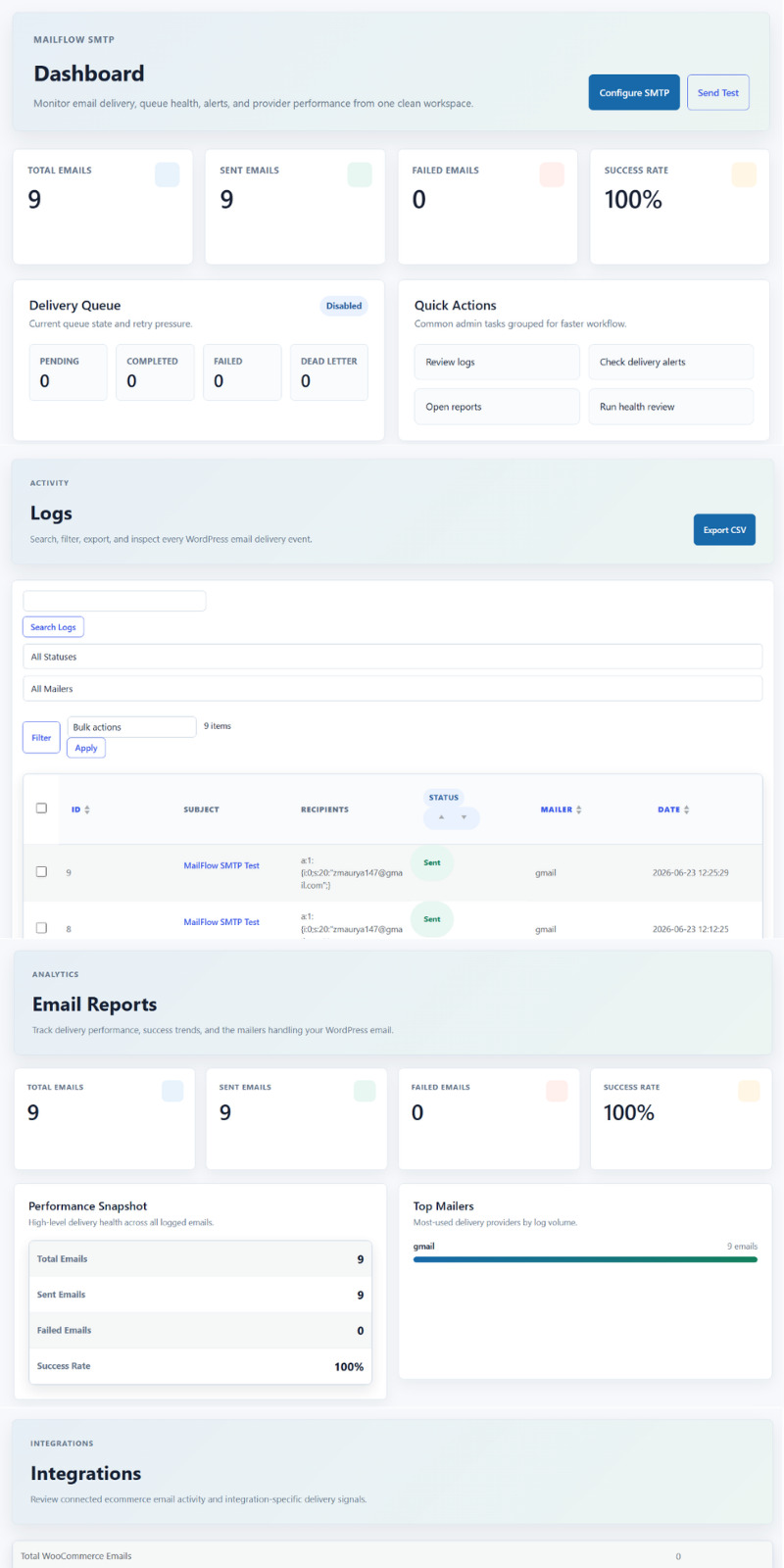
The Dashboard serves as the central monitoring hub for Kaddora MailFlow SMTP. It provides a real-time overview of email delivery performance, queue status, failed email tracking, provider usage, retry activity, and overall system health.
Administrators can quickly monitor email activity, identify delivery issues, review queue statistics, access SMTP configuration, send test emails, open reports, and check delivery alerts from one clean workspace.
Dashboard Highlights
- Centralized email monitoring dashboard
- Real-time email delivery statistics
- Total, sent, and failed email tracking
- Email success rate monitoring
- Delivery queue status overview
- Pending, completed, failed, and Dead Letter Queue statistics
- Quick access to SMTP configuration
- One-click Test Email functionality
- Fast access to Logs, Reports, and Alerts
- Queue health and retry monitoring
- Provider performance visibility
- Clean and responsive enterprise-style interface
- Designed for administrators and support teams
- Supports large-scale email operations
- Helps identify delivery issues before they affect users
SMTP Configuration
The SMTP Configuration section allows administrators to manage email delivery settings, provider credentials, queue behavior, backup mailers, rate limits, WooCommerce-specific routing, and alert preferences.
This section works as the control center for configuring how WordPress emails are sent, monitored, protected, retried, and routed during delivery failures.
SMTP Configuration Features
- Configure primary SMTP provider
- Manage sender email and sender name
- Configure SMTP host, port, and encryption
- Enable or disable SMTP delivery
- Store provider credentials securely
- Support multiple email providers
- Configure backup mailer failover
- Enable or disable email queue processing
- Control email sending rate limits
- Configure WooCommerce-specific mail routing
- Set email failure thresholds
- Configure alert recipients
- Enable email delivery notifications
- Manage alert cooldown periods
- Centralized email delivery management
- Enterprise-grade delivery controls
Supported SMTP Providers
- Gmail SMTP
- Outlook SMTP
- SendGrid SMTP
- Mailgun SMTP
- Brevo SMTP
- Postmark SMTP
- Custom SMTP Servers
Sender and SMTP Settings
- Enable or disable SMTP functionality
- Configure From Email address
- Configure From Name
- Set SMTP Host
- Set SMTP Port
- Select Mailer Provider
- Configure encryption method using TLS or SSL
Provider Credentials
- Gmail Address and App Password
- Outlook Email and Password
- SendGrid API Key
- Mailgun API Key and Domain
- Brevo API Key
- Postmark Server Token
- Custom SMTP Authentication
Delivery and Queue Settings
- Enable Backup Mailer
- Configure Backup SMTP Provider
- Enable Email Queue Processing
- Configure Rate Limit Per Minute
- Configure Rate Limit Per Hour
- WooCommerce Mailer Assignment
- Retry and Failover Management
Alert Settings
- Configure Failure Threshold
- Set Alert Notification Email
- Enable Email Alerts
- Configure Alert Cooldown Period
- Monitor Delivery Failures
- Receive Automated Administrative Notifications
Email Logs
The Email Logs section provides a centralized view of all outgoing email activity generated through Kaddora MailFlow SMTP. It enables administrators to monitor email delivery status, inspect recipients, review delivery events, export records, and troubleshoot email-related issues from a single interface.
Email Log Features
- Complete email delivery history
- Track sent and failed emails
- View email subject and recipient details
- Monitor SMTP provider usage
- Search email logs instantly
- Filter logs by status
- Filter logs by mailer provider
- Sort log entries by column
- Bulk action support
- Export logs to CSV format
- Email delivery auditing
- Delivery troubleshooting tools
- Fast access to email details
- Real-time delivery monitoring
- Administrative reporting support
Log Information Displayed
- Log ID
- Email Subject
- Recipient Address or Addresses
- Delivery Status
- SMTP Provider or Mailer
- Date and Time Sent
Available Log Actions
- Search email records
- Filter by sent or failed status
- Filter by SMTP provider
- Export logs to CSV
- View email details
- Perform bulk operations
- Review delivery history
Delivery Status Types
- Sent: Email was successfully delivered.
- Failed: Email delivery failed and requires review.
- Queued: Email is waiting for processing.
- Retrying: Email is being retried by the retry engine.
- Dead Letter: Email exceeded retry limits and was moved to the Dead Letter Queue.
Email Logs Benefits
- Improves email visibility and monitoring
- Simplifies troubleshooting and diagnostics
- Helps identify delivery failures quickly
- Provides audit-ready email records
- Supports reporting and compliance requirements
Tools Section
The Tools section provides quick access to utilities, diagnostics, and administrative features required for monitoring, troubleshooting, and managing email delivery operations.
It acts as a centralized workspace where administrators can perform SMTP testing, review system health, manage routing rules, inspect delivery events, and diagnose problems without moving through multiple plugin pages.
Tools Features
- Centralized administrative workspace
- Quick access to SMTP testing
- SMTP health and diagnostics tools
- Routing rule management
- Delivery troubleshooting utilities
- Debug event monitoring
- System verification tools
- Provider health checks
- Delivery workflow management
- Faster access to maintenance tasks
- Streamlined navigation experience
- Enterprise-grade monitoring utilities
Available Tools
- Send Test Email: Verify SMTP configuration by sending a test email.
- SMTP Health: Review the overall health and performance of configured mail providers.
- Routing Rules: Manage email routing behavior and provider selection rules.
- Debug Events: Review technical events and delivery-related system activity.
Send Test Email Features
- SMTP connection validation
- Email delivery testing
- Provider verification
- Delivery confirmation
SMTP Health Features
- Delivery health monitoring
- Response time analysis
- Provider reliability checks
- Performance diagnostics
Routing Rules Features
- Smart mail routing
- Provider assignment rules
- Delivery priority configuration
- Routing management
Debug Events Features
- Debug event logging
- Delivery troubleshooting
- Error investigation
- System activity tracking
Tools Benefits
- Simplifies email troubleshooting
- Improves system visibility
- Reduces diagnostic time
- Centralizes maintenance tasks
- Supports enterprise email management workflows
Reports and Analytics
The Reports section provides a comprehensive overview of email delivery performance, provider usage, and system reliability. It helps administrators monitor delivery success rates, identify failed emails, evaluate provider performance, and gain valuable insights into overall email activity through centralized analytics and reporting tools.
Reports Features
- Email Delivery Analytics
- Total Email Statistics
- Sent Email Tracking
- Failed Email Monitoring
- Success Rate Reporting
- Performance Snapshot Dashboard
- Top Mailer Analytics
- Provider Usage Reports
- Delivery Health Monitoring
- Real-Time Statistics
- Email Performance Insights
- Delivery Trend Analysis
- Reliability Monitoring
- Centralized Reporting Dashboard
- Enterprise-Level Analytics
Delivery Management
The Delivery section provides centralized monitoring and management of email delivery operations. It helps administrators track delivery events, monitor alerts, review operational issues, and manage delivery-related activities such as queue processing, routing behavior, failover handling, and notification systems to ensure reliable email delivery across the website.
Delivery Features
- Email Delivery Monitoring
- Delivery Event Tracking
- Queue Management
- Retry Engine Monitoring
- Dead Letter Queue Management
- Smart Routing Management
- Backup Mailer Monitoring
- Delivery Failure Tracking
- Alert Management
- Email Alert Notifications
- Slack Alert Integration
- Discord Alert Integration
- Teams Alert Integration
- Webhook Alert Integration
- Failure Threshold Monitoring
- Alert Severity Tracking
- Operational Event Logging
- Delivery Health Monitoring
- Delivery Diagnostics
- Enterprise-Level Delivery Management
Integrations
The Integrations section provides visibility into email activity generated by connected WordPress plugins and third-party services. It helps administrators monitor integration-specific email delivery, track transactional emails, review integration performance, and ensure reliable communication across connected systems such as eCommerce platforms, contact forms, and other email-enabled applications.
Integration Features
- WooCommerce Email Tracking
- Transactional Email Monitoring
- Integration Activity Dashboard
- Connected Plugin Analytics
- Integration-Specific Delivery Insights
- Email Performance Monitoring
- Delivery Event Tracking
- Integration Health Monitoring
- Email Volume Statistics
- Provider Usage Analysis
- Delivery Reliability Monitoring
- Integration Reporting
- Email Activity Auditing
- WooCommerce Compatibility
- Contact Form 7 Compatibility
- WPForms Compatibility
- Multisite Integration Support
- Centralized Integration Management
- Enterprise-Level Email Visibility
Performance and Optimization
Kaddora MailFlow SMTP is designed for performance, scalability, and reliability. It uses optimized SMTP delivery processes, queue handling, background processing, efficient database storage, indexed log tables, cached dashboard statistics, optimized report generation, and scalable architecture for high email volumes.
Performance Features
- Optimized SMTP Delivery Engine
- Smart Email Routing
- Backup Mailer Failover
- Email Queue Processing
- Retry Engine
- Dead Letter Queue Management
- Rate Limiting Controls
- Optimized Database Queries
- Indexed Database Tables
- Efficient Log Storage
- Lightweight Admin Interface
- Cached Dashboard Statistics
- Optimized Report Generation
- Scheduled Background Processing
- WP-Cron Integration
- Reduced Server Load
- Fast Email Log Search
- Bulk Action Optimization
- Network-Wide Analytics Optimization
- Scalable Architecture for High Email Volumes
- Resource-Efficient Monitoring
- Performance-Focused Reporting
- Enterprise-Level Email Processing
- Minimal Frontend Impact
- Optimized Multisite Support
Why Choose Kaddora MailFlow SMTP
- Improves WordPress email deliverability
- Reduces failed email delivery issues
- Provides clear visibility into outgoing emails
- Helps troubleshoot SMTP problems quickly
- Supports multiple professional SMTP providers
- Includes backup mailer failover for reliability
- Supports queue processing for better email control
- Provides alerts for delivery failures and system issues
- Works with WooCommerce transactional emails
- Supports popular form plugins such as Contact Form 7 and WPForms
- Provides enterprise-level tools for agencies and large websites
- Supports WordPress Multisite network management
Ideal For
- WordPress website owners
- WooCommerce store owners
- Digital agencies
- Developers
- Website administrators
- Support teams
- Membership websites
- Learning management websites
- Corporate websites
- Enterprise WordPress environments
- WordPress Multisite networks
Frequently Asked Questions
Which SMTP providers are supported by Kaddora MailFlow SMTP?
Kaddora MailFlow SMTP supports Gmail, Outlook, SendGrid, Mailgun, Brevo, Postmark, and Custom SMTP servers.
Can I view and track all outgoing emails?
Yes. The plugin includes a complete Email Logs system that allows you to monitor sent, failed, queued, retrying, and dead letter emails.
Does the plugin support WooCommerce email delivery?
Yes. Kaddora MailFlow SMTP is compatible with WooCommerce and can track transactional emails generated by WooCommerce stores.
What happens if my primary SMTP provider fails?
The Backup Mailer feature can switch email delivery to a secondary provider to help maintain email reliability.
Can I receive notifications when email delivery issues occur?
Yes. The plugin supports Email, Slack, Discord, Microsoft Teams, and Webhook alerts for delivery failures and operational events.
Is the plugin compatible with WordPress Multisite?
Yes. Kaddora MailFlow SMTP includes Multisite support with network-wide settings, reporting, monitoring, and analytics.
Support and Updates
For technical support, feature requests, bug reports, or plugin-related assistance, users can contact the Kaddora Tech Support Team. Kaddora MailFlow SMTP is built for reliable long-term usage with regular updates, compatibility improvements, performance enhancements, security updates, and bug fix releases.
Support Includes
- Installation Assistance
- SMTP Configuration Help
- Email Delivery Troubleshooting
- WooCommerce Compatibility Support
- Multisite Configuration Assistance
- Bug Reporting and Fixes
- Performance Optimization Guidance
- Feature Update Notifications
Update Policy
- Regular Feature Updates
- Security Enhancements
- Performance Improvements
- Compatibility Updates
- Bug Fix Releases
Current Version
Current Version: 1.0.0
Thanks for choosing Kaddora MailFlow SMTP.
0 Reviews for this product
0 Comments for this product